Showing posts with label Oracle. Show all posts

Thursday, April 28, 2016

Slides and demo script from my ORDS talk at APEX Connect 2016 in Berlin

Hi everybody,

I just came back from the DOAG APEX Connect 2016 conference in Berlin ... very nice location, great content and the wonderful APEX community to hang out with ... always a pleasure. This time we felt a little bit pink ;)

As promised, you can download the slides and the demo script (as is) from my site.

Instructions are included.

See you at KScope in Chicago, #letswreckthistogether .

Cheers and enyoy!
~Dietmar. 


Wednesday, May 22, 2013

DOAG 2013 Development in Bonn am 19. Juni


Am 19.Juni 2013 findet die nächste DOAG Development Konferenz in Bonn statt, diesmal mit dem Thema:

„Agile and Beyond – Projektmanagement in der Oracle-Softwareentwicklung“

Das Motto der zweiten Auflage der Community Konferenz steht fest: Die effektive Durchführung von Softwareprojekten steht thematisch im Zentrum der Konferenz für Entwickler, Softwarearchitekten und Projektleiter.

Gerade Oracle APEX eignet sich hervorragend für die agile Durchführung von Softwareprojekten, ich habe damit seit Jahren hervorragende Ergebnisse erzielt. Mit Oracle APEX kann man in extrem kurzen Iterationszyklen von 1-4 Wochen sehr beachtliche Funktionalitäten implementieren. Gerade die Lieferung von Funktionalitäten in kurzen Abständen hilft, das Vertrauen der Fachseiten zu gewinnen. Dennoch gibt es einige Fallstricke zu beachten, damit auch alles rund läuft ;).

Weitere Informationen zur Konferenz finden Sie hier.

Bitte beachten: der Frühbucher-Rabatt endet heute!

Viele Grüße,
~Dietmar. 

How to locate all interactive reports in my application?

Today my client decided to remove the email functionality from all interactive reports in their APEX application.

I could step through all the pages of my application and check whether there are any interactive reports used. This very manual approach can take some time and I can make mistakes by overlooking some of the interactive reports to modify.

A different approach would be to use the (officially supported) data dictionary views in APEX. Using this simple sql query I can find all interactive reports in all pages of my application (having the id 20120618):
select   workspace
       , application_id
       , application_name
       , page_id
       , region_name
       , download_formats
  from apex_application_page_ir
 where application_id=20120618
 order by page_id;
This will show all interactive reports which are used in my application:


We can even look for all interactive reports that need to be fixed by specifically looking for all reports where the download format email is enabled:
select   workspace
       , application_id
       , application_name
       , page_id
       , region_name
       , download_formats
  from apex_application_page_ir
 where application_id=20120618
   and instr(download_formats, 'EMAIL') > 0
 order by page_id;
These data dictionary views contain a wealth of information about your application. This is a real strength of Oracle Application Express, due to its nature being driven by a metadata repository.

Thus from a quality management perspective you could use the following query to make sure, all interactive reports are configured the same way, i.e. having flashback disabled, using the same display position for pagination (Top and Bottom-Left) and showing the dropdown list for selecting the rows per page:
select   workspace
       , application_id
       , application_name
       , page_id
       , region_name
       , pagination_display_position
       , show_rows_per_page
       , show_flashback
  from apex_application_page_ir
 where application_id=20120618
   and (   pagination_display_position <> 'Top and Bottom - Left'
        or show_rows_per_page = 'No'
        or show_flashback = 'Yes' )
 order by page_id;
Here is the result:


But how do we find the appropriate views? The APEX data dictionary contains information about all available data dictionary views and all of their columns.

Typicall I use the following query to find all information about interactive reports, all related views contain _IR_ in the view name:
select *
  from apex_dictionary
 where apex_view_name like '%IR%'
This will show us all view including their respective columns:


If we want to display the view only without their columns we can add the filter for the column_id 0, in there the APEX team added the overall description of the view itself:
select *
  from apex_dictionary
 where apex_view_name like '%IR%'
   and column_id=0; 
Now, we get only the view names including their description:


Regards,
~Dietmar.

Thursday, December 27, 2012

Presentation available for download

In November I have been presenting at the last DOAG conference in Germany about documentation in APEX projects ( http://daust.blogspot.de/2012/11/presenting-at-doag-next-week.html ). The presentation (only in German) is now available for download.

Cheers,
~Dietmar.

Monday, December 17, 2012

APEX 4.2.1 Patchset released

Two days ago on Friday, the APEX 4.2.1 patch set has been released.

Although the quality of APEX is really high compared with other products, I tend to ALWAYS wait for the first patch set.

Ok, no more excuses for not upgrading to APEX 4.2 :).

Cheers and enjoy,
~Dietmar.

Monday, December 10, 2012

Speaking at ODTUG's KScope 13 in New Orleans

My abstracts for Oracle Application Express have just been accepted for presentation at ODTUG Kscope13, June 23-27, at the New Orleans Sheraton in New Orleans, LA:
  • APEX + XE: a cookbook for a secure setup 
  • A spotlight on the smaller improvements of APEX 4.2 
This is THE best conference for Oracle developers worldwide. 900 abstracts have been submitted this year and it was a real challenge to decide what will make it and what not.

Really looking forward to New Orleans. In 2008 I was speaking at ODTUG for the first time in New Orleans.

It was so cool and we had such a good time with my friends Patrick Wolf, Joel Kallman and Carl Backstrom.


Carl, we miss you!!!

See you at New Orleans,
~Dietmar.

Thursday, January 28, 2010

APEX Stammtisch am 22.02.2009 in Siegburg

The following post is targeted towards a German audience, thus it is in German:
~~~~~~~~~~~~~~~~~~~~~~~~~~~~~~~~~~~~~~~~~~~~~~~~~~~~~~~
Wir (Denes Kubicek und Dietmar Aust) werden am 22 Februar 2010 um 19:00 noch einmal den APEX Stammtisch in einer lockeren Variante durchführen, einfach nur ein leckeres Bier, gutes Essen, interessante Gespräche rund um APEX und interessante Leute.
Weitere Details und die kostenlose Anmeldung findet Ihr hier ...

Wir freuen uns auf ein lockeres Kennenlernen bei einem Bier und evtl. leckerem Flammkuchen.

Viele Grüße und bis zum Stammtisch,
~Dietmar.

Thursday, January 14, 2010

Jasper Reports Integration - beta release v0.8.0.0

First the good news: I have finally wrapped up the Jasper Reports Integration package and made it available for download.

It is in beta quality and needs some more testing (of the code and documentation) before it should be used in production. Once it hits the first production release, the interface packages should remain stable. Until then they might change with the later beta releases.

Everybody who wants to join the beta program is more than welcome! Any feedback is welcome.

You can get all the files, infos about the architecture and the installation guides here.

Then, I really have to apologize for taking so long (I had promised to release it much earlier) and not responding to many of the emails I have received. I am really sorry for that but my life has gone haywire in the last year - and I am still recovering from that. 

Update on 04.09.2010: Version 1.1.0.0 is now available: http://daust.blogspot.com/2010/09/jasper-reports-integration-v1100.html

Regards,
~Dietmar.

Wednesday, January 28, 2009

APEX Stammtisch am 10.2.2009 in Siegburg

The following post is targeted towards a German audience, thus it is in German:
~~~~~~~~~~~~~~~~~~~~~~~~~~~~~~~~~~~~~~~~~~~~~~~~~~~~~~~

Wir (Denes Kubicek und Dietmar Aust) werden am 10 Februar 2009 um 19:00 noch einmal den APEX Stammtisch in einer lockeren Variante durchführen, einfach nur ein leckeres Bier, gutes Essen, interessante Gespräche rund um APEX und interessante Leute.
Weitere Details und die kostenlose Anmeldung findet Ihr hier ...

Danach werden wir dem Stammtisch ein wenig mehr Struktur geben. Bei den Treffen werden wir uns dann auf einige wenige Themen konzentrieren, die im Vorfeld bekannt gegeben werden. Die Teilnehmer können auch gerne ihre eigenen APEX Applikationen vorstellen, ein Beamer wird vorhanden sein.

Wir freuen uns auf ein lockeres Kennenlernen bei einem Bier und evtl. leckerem Flammkuchen.

Leider ist seit dem letzten Stammtisch viel zu viel Zeit vergangen. Dennoch wollen wir es noch einmal versuchen, die Veranstaltung in regelmäßigen Abständen durchzuführen.

Viele Grüße und bis zum Stammtisch,
~Dietmar.

Sunday, November 09, 2008

APEX Training in Bensheim (23.03 - 25.03.2009)

We (Denes Kubicek, Patrick Wolf and Dietmar Aust) are happy to announce the next APEX Training in Bensheim/Germany. Thus the rest of the post is in German.

Das nächste APEX Training findet am 23.03.2009 bis zum 25.03.2009 erneut in Bensheim bei Frankfurt statt, im dortigen Aleehotel.

Oracle APEX: Knowhow aus der Praxis

Nutzen Sie das Wissen und die Erfahrung von
  • Patrick Wolf, langjähriger Oracle Veteran und Senior Solution Architect bei einer Wiener IT Firma, wurde erst kürzlich vom Oracle Magazin zum „Oracle APEX Developer of the year 2007“ ausgezeichnet. Er ist weiterhin ein Oracle ACE und Betreiber des bekannten Blogs Inside Oracle APEX,

  • Denes Kubicek, langjährige Projekterfahrung in den Bereichen Oracle und APEX mit multisite Applikationen, diesjähriger Preisträger des "Oracle APEX Developer of the Year 2008" Awards des Oracle Magazines und sehr bekannt im Oracle APEX OTN Forum für seine Beispielapplikation und

  • Dietmar Aust, erfahrener Oracle Consultant mit Spezialisierung auf Oracle Apex, aktiv in den OTN Foren zu Apex und Oracle XE, mit Präsentationen auf den letzten DOAG Veranstaltungen

, um Best Practice Vorgehensweisen aus vielen erfolgreichen APEX Projekten zu lernen.

Neben einer Fülle an Informationen, die wir in vielen erfolgreichen APEX Projekten erarbeitet haben, sind insbesondere die abendlichen Sessions (von 19:00-21:00) als Highlight zu nennen.

Dort stehen wir Ihnen für zusätzliche Hands-On Sessions zur Verfügung, um die Beispiele des Tages durchzuarbeiten oder auch, um konkrete Fragestellungen in Ihren aktuellen Projekten zu diskutieren.

Insgesamt haben wir das Kursprogramm noch etwas aufgeräumt und einige Hands-on Übungen integriert.

Weitere Details zum Kurs sowie die Anmeldung finden Sie hier.

~Dietmar Aust.

Thursday, February 28, 2008

APEX 3.1 is coming closer ...

The release date of Oracle APEX 3.1 seems to be coming closer :). The hosted online version on apex.oracle.com has been upgraded yesterday.

I presume they will just fix some minor bugs and resolve some performance issues, then it should be ready for prime time !!!

Many interesting features are coming along, see

Greetinx,
~Dietmar.

Saturday, March 10, 2007

Apex Community Page updated

Last Wednesday, the community page on Application Express was updated.

You can find there links to

* APEX Community
* Special Interest Groups
* Consulting Companies
* Hosting Companies
* BLOGs
* Commmunity How-Tos and Articles

Regards,
~Dietmar.

Denes Kubicek - ApEx Demo

Many of us are already familiar with the excellent work of Denes Kubicek in the Apex forum. Especially his API to the cool xml charts ( XML/SWF Charts).

You can find his demo applications here.
The xml charts API can be found here.

Enjoy,
~Dietmar.

Friday, January 26, 2007

Oracle: Changing the value for SYSDATE

In many applications you work with time sensitive data, e.g. a table of products that have valid_from and valid_to dates.

You might want to display the currently valid products at some point and thus compare the current date (SYSDATE) to the valid_from and valid_to date values.

Or you calculate some values based on the value of SYSDATE.

These parts of your application are difficult to test. Altering the system clock is generally not a good idea!!!

So, how can you do this? Usually you have to modify the test data or change the code for testing purposes. But this is cumbersome and you usually can only test parts of the program.

I have come across this post recently how to set a specific fixed return value when you call SYSDATE.

It is very simple, you can set any date as the current date for SYSDATE:

ALTER SYSTEM SET fixed_date = '2003-01-01-10:00:00';
can be reset with a simple
ALTER SYSTEM SET fixed_date = NONE;


Consider the following example:


HR@o102> conn hr/hr
Connected.
HR@o102> select to_char(sysdate, 'dd.mm.yyyy hh24:mi:ss') now from dual;

NOW
-------------------
26.01.2007 22:18:56

HR@o102> create table products(id number, product varchar2(50), valid_from date, valid_to date);

Table created.

HR@o102> insert into products(id,product,valid_from,valid_to)
2 values (1, 'product1', to_date('01.01.2006','dd.mm.yyyy') , to_date('25.12.2007','dd.mm.yyyy'));

1 row created.

HR@o102> insert into products(id,product,valid_from,valid_to)
2 values (2, 'product2', to_date('01.01.2006','dd.mm.yyyy') , to_date('25.01.2007','dd.mm.yyyy'));

1 row created.

HR@o102> insert into products(id,product,valid_from,valid_to)
2 values (3, 'product3_new', to_date('31.01.2007','dd.mm.yyyy') , to_date('31.12.2007','dd.mm.yyyy'));

1 row created.

HR@o102> commit;

Commit complete.

HR@o102> create or replace view products_current_v as
2 select * from products where trunc(sysdate) between valid_from and valid_to;

View created.

HR@o102> select id, product from products_current_v;

ID PRODUCT
---------- --------------------------------------------------
1 product1

HR@o102> conn / as sysdba
Connected.
SYS@o102> alter system set fixed_date='2006-12-31-10:00:00';

System altered.

SYS@o102> conn / as sysdba
Connected.
SYS@o102> select to_char(sysdate, 'dd.mm.yyyy hh24:mi:ss') now from dual;

NOW
-------------------
31.12.2006 10:00:00

SYS@o102> select id, product from hr.products_current_v;

ID PRODUCT
---------- --------------------------------------------------
1 product1
2 product2

SYS@o102> conn / as sysdba
Connected.
SYS@o102> alter system set fixed_date='2007-02-01-10:00:00';

System altered.

SYS@o102> conn hr/hr
Connected.
HR@o102> select to_char(sysdate, 'dd.mm.yyyy hh24:mi:ss') now from dual;

NOW
-------------------
01.02.2007 10:00:00

HR@o102> select id, product from products_current_v;

ID PRODUCT
---------- --------------------------------------------------
1 product1
3 product3_new

HR@o102> conn / as sysdba
Connected.
SYS@o102> alter system set fixed_date=none;

System altered.

SYS@o102> select to_char(sysdate, 'dd.mm.yyyy hh24:mi:ss') now from dual;

NOW
-------------------
26.01.2007 22:18:56

Update 22.03.2007

There is an important thing to note!!! In Oracle 9.2.x there is a bug regarding the setting of fixed_date. Once you restart the instance, you will run into an oracle error: ORA-00065: initialization of FIXED_DATE failed

SQL> ALTER SYSTEM SET fixed_date = '2007-04-01-10:00:00';
System altered.

SQL> ALTER SYSTEM SET fixed_date = NONE;
System altered.

SQL> shutdown immediate;
Database closed.
Database dismounted.
ORACLE instance shut down.
SQL> startup
ORA-00065: initialization of FIXED_DATE failed
SQL>

Once you hit this error, you will need to recover using the following approach:
SQL> create pfile from spfile;
File created.
A new pfile was created in the $ORACLE_HOME/dbs directory, in my case:
/opt/oracle/product/9205/dbs/inito920.ora

Edit the file and delete the line *.fixed_date='NONE'

Then restart the database:
SQL> startup pfile=/opt/oracle/product/9205/dbs/inito920.ora
ORACLE instance started.

Total System Global Area 571545196 bytes
Fixed Size 452204 bytes
Variable Size 402653184 bytes
Database Buffers 167772160 bytes
Redo Buffers 667648 bytes
Database mounted.
Database opened.

SQL> create spfile from pfile;
File created.
Then restart the database to have it started using the spfile.

SQL> shutdown immediate;
Database closed.
Database dismounted.
ORACLE instance shut down.
SQL> startup
ORACLE instance started.

Total System Global Area 571545196 bytes
Fixed Size 452204 bytes
Variable Size 402653184 bytes
Database Buffers 167772160 bytes
Redo Buffers 667648 bytes
Database mounted.
Database opened.
SQL>
Now do it again, this time the proper way:

SQL> ALTER SYSTEM SET fixed_date = '2007-04-01-10:00:00';

System altered.

SQL> ALTER SYSTEM SET fixed_date = NONE;

System altered.

SQL> alter system reset FIXED_DATE scope=spfile sid='*';

System altered.

SQL> shutdown immediate;
Database closed.
Database dismounted.
ORACLE instance shut down.
SQL> startup
ORACLE instance started.

Total System Global Area 571545196 bytes
Fixed Size 452204 bytes
Variable Size 402653184 bytes
Database Buffers 167772160 bytes
Redo Buffers 667648 bytes
Database mounted.
Database opened.
SQL>

Regards,
~Dietmar.

Tuesday, January 16, 2007

XE: ODBC connection to a remote XE server

How do you set up an ODBC connection to a XE instance on a remote server?

The basic steps are:
* Download and install the XE client on your Windows machine
* Create an ODBC DSN entry
* Create a new MS Access MDB and link two tables from XE (using the sample user HR)

First, you download the XE Client software from the Oracle Technet: http://www.oracle.com/technology/software/products/database/xe/index.html

Double-click on the downloaded file to install it:


During the installation choose to install the client software into a directory of your choice and finish the installation.


After that you can configure the ODBC entry. Goto Start > Control Panel > Administration > ODBC DatasourcesOn the tab System-DSN add another data source:


Choose Oracle in XEClient:


Enter the details for the connection to the remote machine, in my case the remote machine is daust3.opal-consulting.de

Data Source Name: choose an arbitrary name
Description: choose an arbitrary description
TNS Service Name: host:port/SID
User ID: Oracle user to connect to

The service name is critical here, the hostname is the name of the remote machine but it can also be an ip-address. The port is the port on which the Oracle listener is operating, usually 1521. The SID is fixed, it is called XE.

Then test the connection by entering the password for the user HR. The result has to be "Connection successful".


After that start MS Access (in my case I used MS Access 2000) and create a link to the tables stored in XE. You can do this either by clicking on New > Link table


or by right clicking in the table pane and selecting Link Tables ...


then choose ODBC Databases from the bottom of the list:


Choose the computer data source XE, which we just configured:


then enter the password for the user HR. You can also just overwrite the User Name with a different user you want to connect to:


then select the relevant tables by holding down the control-key and click on the table names. Then hit OK.


Voila! The tables are linked and you can start using them:


Just be aware of firewalls!!! If you cannot connect to the remote machine the reason can be that port 1521 is blocked by your firewall!

Update: 18.01.2007

Storing the password in the DSN entry

You can also store the password together with the username in the DSN entry. This way the login prompt won't show when you link tables in MS Access. This might be useful in certain situations.
Just use the username/password in the User ID field when configuring the DSN entry.
For example you want to connect as the oracle user HR with password hrpwd. Then enter HR/hrpwd as the User ID instead of HR.

Thanks to Jer for this tip ( post in the XE forum ) .


Update: 18.01.2007

Using tnsnames.ora with XE client

In the DSN entry you can specify the connection information to the XE server instance using the easy connect syntax, just as shown above.

But you can also use the traditional resolution via the tnsnames.ora file. This adds another layer of abstraction so that you can access the tnsnames entry in you VBA code and not hardcode the server, port and SID information into your code.

To accomplish this, the following steps are necessary:

First, you have to add the variable TNS_ADMIN to your Oracle configuration in the registry.
Start regedit and go to HKEY_LOCAL_MACHINE\SOFTWARE\ORACLE\KEY_XEClient.


Then add a new string called TNS_ADMIN. Set the value to the directory where you want to store the tnsnames.ora file (you can also reference a directory of another Oracle install where a valid file is located).


Then create (or copy) the file tnsnames.ora and enter the following content:

XE =
(DESCRIPTION =
(ADDRESS = (PROTOCOL = TCP)(HOST = DAUST3.opal-consulting.de)(PORT = 1521))
(CONNECT_DATA =
(SERVER = DEDICATED)
(SERVICE_NAME = XE)
)
)

Then you can reconfigure your DSN entry and replace daust3.opal-consulting.de:1521/XE with XE.


Regards,
~Dietmar.

Friday, September 15, 2006

Apex: Database authentication - an alternative solution

Using native Oracle accounts for an Apex application has been a long requested feature.

Up until version 2.0 of Oracle Application Express (aka HTML DB) your choice of using authentication schemes (out of the box) were:

- Show Built-In Login Page and Use Open Door Credentials
- Show Login Page and Use HTML DB Account Credentials
- Show Login Page and Use LDAP Directory Credentials
- No Authentication (using DAD)
- Oracle Application Server Single Sign-On (HTML DB Engine as Partner App)
- Oracle Application Server Single Sign-On (My Application as Partner App)

With the release of Oracle Express Edition you could also use existing database accounts for authentication purposes out of the box, but this would only work with Oracle Express Edition.


In this release the developers of the database implemented an internal password validation check which is used to provide the functionality. The code for Oracle XE is based on the code release of Oracle 10gR2 (10.2.0.1).

Unfortunately this functionality was not available for Apex applications running version 2.0.

With the release of Apex 2.2 you can now also use the database authentication scheme out of the box. Unfortunately this has some limitations / drawbacks:

If you install Apex 2.2 into an Oracle version 10.2.0.3 and above, it will use the native password validation function and everything will be fine.

If you install Apex 2.2 instead into an Oracle version below 10.2.0.3, it will provide the same functionality but use a different approach. They store the current password, change the password on the fly, compare the password and reset the password afterwards if they were not equal (alter user identified by values [old_password_hash]): http://forums.oracle.com/forums/message.jspa?messageID=869036#869036

This can cause problems (i.e. ORA-28007: the password cannot be reused) in the case you use password policies in your Oracle database (http://forums.oracle.com/forums/thread.jspa?forumID=137&threadID=422914)

In a recent project we have come up with a different solution to this problem. Many thanks to Ulrich Kämmerer (http://www.creon-it.de/) for figuring this out with me.

We used a jdbc thin connection to validate the password from whithin the database using java stored procedures.

Here is the solution (you can download all the required files at the end of this post):

We assume the following values for this sample, please change accordingly to match your system:
- Apex application schema: APEX_TEST
- Password for this schema: apex_test
- Listener port for this Oracle instance: 1521
- Tnsnames entry for the instance: o920
- Oracle SID for the instance: o920

1) Create the java class PasswordValidator:

import java.sql.*;
import oracle.jdbc.*;

public class PasswordValidator
{
public PasswordValidator()
{
}

public static int isValidPassword(String pServerName, String pListenerPort, String pSID, String pUserName, String pPassword) throws SQLException
{
boolean bIsValid = false;

try{
DriverManager.registerDriver(new OracleDriver());
Connection conn = DriverManager.getConnection("jdbc:oracle:thin:@" + pServerName + ":" + pListenerPort + ":" + pSID, pUserName, pPassword);
bIsValid = true;

} catch (SQLException e)
{
//e.printStackTrace();
//System.out.println("ErrorCode=" + e.getErrorCode());

if (e.getErrorCode() == 1017)
{
// ORA-01017: invalid username/password
bIsValid = false;
} else {
//result = e.getMessage();
// re-raise exception
throw(e);
}
}

return bIsValid == true ? 1 : 0;
}
}

2) Compile the java class

3) Load the java class into the database:

loadjava -user APEX_TEST/apex_test@o920 PasswordValidator.class

4) Grant the proper rights using the SYS account:

begin
dbms_java.grant_permission('APEX_TEST','SYS:java.net.SocketPermission', 'localhost:1521', 'connect,resolve' );
end;
/

5) Modify the package variables to match your settings:

c_server_name CONSTANT VARCHAR2 (50) := 'localhost';
c_listener_port CONSTANT VARCHAR2 (50) := '1521';
c_sid CONSTANT VARCHAR2 (50) := 'o920';

6) Install the package in your Apex schema (e.g. APEX_TEST):

CREATE OR REPLACE PACKAGE apex_sec_pck IS
/******************************************************************************
NAME: APEX_SEC_PCK
PURPOSE: Security Package for database authentication
(using jdbc thin connections)


REVISIONS:
Ver Date Author Description
--------- ---------- --------------- -----------------------------------
1.0 14.06.2006 D. Aust Initiale Erstellung

******************************************************************************/

/**************************************************************************
Constants and Types
**************************************************************************/

/*======================================================
FUNCTION is_valid_password_fc

Tests, wether this username/password is a valid combination
for this instance.

Parameter : p_username
Parameter : p_password
Return : boolean
Exception :
=======================================================*/
FUNCTION is_valid_password_fc (p_username IN VARCHAR2, p_password IN VARCHAR2)
RETURN boolean;


END;
/

CREATE OR REPLACE PACKAGE BODY apex_sec_pck IS
c_server_name CONSTANT VARCHAR2 (50) := 'localhost';
c_listener_port CONSTANT VARCHAR2 (50) := '1521';
c_sid CONSTANT VARCHAR2 (50) := 'o920';


FUNCTION is_valid_password_java_wrp_fc (p_server_name IN VARCHAR2, p_listener_port IN VARCHAR2, p_sid IN VARCHAR2, p_username IN VARCHAR2, p_password IN VARCHAR2)
RETURN NUMBER AS
LANGUAGE JAVA
NAME 'PasswordValidator.isValidPassword(java.lang.String, java.lang.String, java.lang.String, java.lang.String, java.lang.String) return int';

-----------------------------------------------------------------------------
--
--
--
FUNCTION is_valid_password_fc (p_username IN VARCHAR2, p_password IN VARCHAR2)
RETURN BOOLEAN IS
l_user VARCHAR2 (30);
l_retval NUMBER;
BEGIN
l_retval := is_valid_password_java_wrp_fc (p_server_name => c_server_name, p_listener_port => c_listener_port, p_sid => c_sid, p_username => p_username, p_password => p_password);

IF l_retval = 1 THEN
RETURN TRUE;
ELSE
RETURN FALSE;
END IF;
EXCEPTION
WHEN OTHERS THEN
DBMS_OUTPUT.put_line (SQLERRM);
RETURN FALSE;
END;

END;
/

7) Now test your password validation function in sql/plus:

SET serveroutput on

BEGIN
DBMS_OUTPUT.put ('Password test 1 (correct password): ');

IF apex_sec_pck.is_valid_password_fc ('apex_test', 'apex_test')
THEN
DBMS_OUTPUT.put_line ('password is valid');
ELSE
DBMS_OUTPUT.put_line ('password is *not* valid');
END IF;

DBMS_OUTPUT.put ('Password test 2 (incorrect password): ');

IF apex_sec_pck.is_valid_password_fc ('apex_test', 'incorrect_pwd')
THEN
DBMS_OUTPUT.put_line ('password is valid');
ELSE
DBMS_OUTPUT.put_line ('password is *not* valid');
END IF;
END;
/

8) Create a new authentication scheme in Apex:

The only three relevant entries are (leave everything else empty / use defaults):

a) Invalid session target : Page in this application => 101

b) Credentials Verification Method: Use my custom function to authenticate
=> return apex_sec_pck.is_valid_password_fc

c) Logout url: wwv_flow_custom_auth_std.logout?p_this_flow=&APP_ID.&p_next_flow_page_sess=&APP_ID.:1

You can download all source files, the compiled java class and a sample application (f118.sql) using this authentication scheme here: http://www.opal-consulting.de/downloads/db_authentication_jdbc.zip

Regards,
~Dietmar.

Thursday, September 14, 2006

Back online ...

Hi guys,

I have been offline for quite a while being busy with my Apex projects at my clients ;). Apex is really taking off!!!

And just recently my little and beautiful daughter Lavinia Alessia Marie was born!!!

The first album on Flickr

The album as a slide show

So this has kept me busy lately. We are really happy and things are going well.

Happy posting again.

Regards,
~Dietmar.

Tuesday, April 11, 2006

Apex: New Frappr Group for Apex Services

Most people in the Forum love Oracle Application Express, but we feel it needs some more visibility.

I have created a new group on Frappr for Oracle Application Express Services :
http://www.frappr.com/oracleapplicationexpressservices


There you can find services related to Oracle Application Express: consultants, developers, hosting services and products based on Apex.

Please add yourself to the map if you provide any services related to Oracle Application Express.
There is also another listing of services on the Wiki page for Application Express.

We also feel that we might need some more prebuilt applications like in the Apex Studio on OTN.

I don't know yet what we (the community) will come up with, but it will be interesting. So stay tuned ...

~Dietmar.
Sunday, April 09, 2006

XE: Calling stored procedures

Using the Oracle web toolkit and the PL/SQL gateway (either via mod_plsql or DBMS_EPG) you can call stored procedures via http(s) to generate output for the browser (HTML, XML, basically any content for any mime-type).

The syntax for this is
http://<server>:<port>/<dad>/<schema>.<procedure>

For example, if you wanted to call the procedure called HELLO_WORLD in the schema HR, you would use the following url (in a default Oracle XE installation on port 8080): http://127.0.0.1:8080/apex/hr.hello_world .

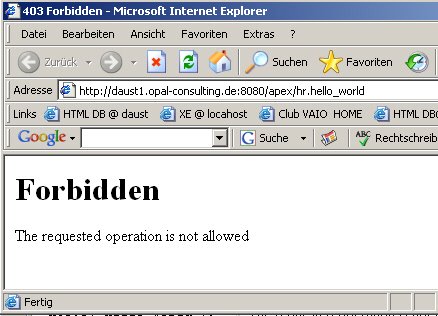
This doesn't work with Oracle XE (production) any longer but will result in an 403 Forbidden error:


In Oracle XE (production) you will have to "allow" a stored procedure to
be called through the embedded plsql gateway (DBMS_EPG) due to a stricter security
control.


This is documented in the Oracle XE documentation here.

The behaviour is controlled via the DAD-attribute request-validation-function ,
which maps to the stored function wwv_flow_epg_include_modules.authorize in
the schema FLOWS_020100. You can modify the existing
stored function called wwv_flow_epg_include_mod_local to
add more procedures to the list of modules that are allowed to be called.

Below you will see a full example of allowing the procedure hello_world to
be called:

1) create procedure hello_world
conn HR/<pwd>@xe

create or replace procedure hello_world as
begin
htp.p('hello world');
end;
/

grant execute on hello_world to anonymous
/

2) connect as SYSTEM and modify the function in the schema FLOWS_020100
conn SYSTEM/<pwd>@xe

alter session set current_schema=FLOWS_020100;

CREATE OR REPLACE function wwv_flow_epg_include_mod_local(
procedure_name in varchar2)
return boolean
is
begin
--
-- Administrator note: the procedure_name input parameter may be in the format:
--
-- procedure
-- schema.procedure
-- package.procedure
-- schema.package.procedure
--
-- If the expected input parameter is a procedure name only, the IN list code shown below
-- can be modified to itemize the expected procedure names. Otherwise you must parse the
-- procedure_name parameter and replace the simple code below with code that will evaluate
-- all of the cases listed above.
--
if upper(procedure_name) in (
'HR.HELLO_WORLD') then
return TRUE;
else
return FALSE;
end if;
end wwv_flow_epg_include_mod_local;
/

3) Now you can call it via http://127.0.0.1:8080/apex/hr.hello_world

// Make sure you compare the procedure name in upper case, i.e HR.HELLO_WORLD and not hr.hello_world!!!

Update: 22.05.2006

How to modify the stored function directly using SQL developer

You can also use the free Oracle tool SQL Developer to modify the stored function directly.

The stored function is located in the schema FLOWS_020100. This account is locked by default, thus you would have to unlock the account first in order to use the user FLOWS_020100 to modify the stored function.

Another option is to use a DBA account like SYSTEM to modify the stored function. The following step by step instructions explain how to do it.

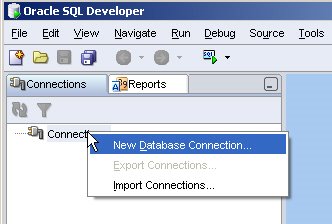
1) After starting SQL Developer, right-click with the mouse on the connection and select "New Database Connection" .

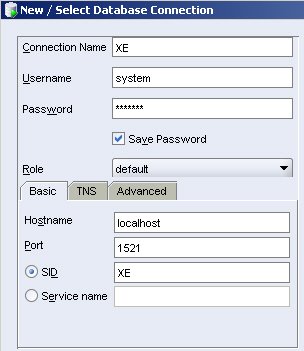
2) Fill in the following details to establish a connection to your local XE instance, then click on "connect"


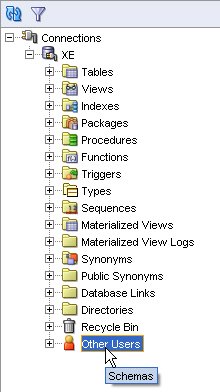
3) Next, click on XE, then Other Users.


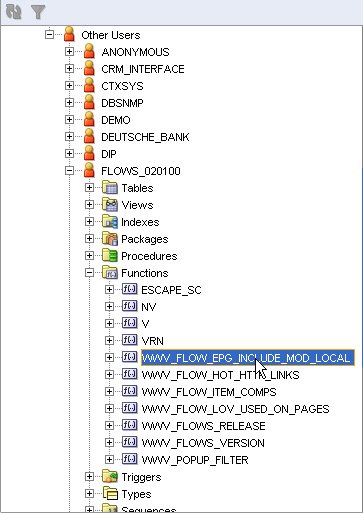
4) Click on FLOWS_020100, then Functions, after that on WWV_FLOW_EPG_INCLUDE_MOD_LOCAL:


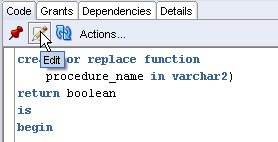
5) Click on "Edit" in the right panel, where you can see the function you want to edit

6) Edit the function

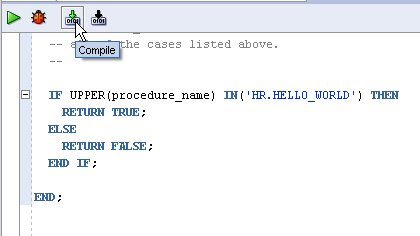
7) Compile the function

That's it. You don't have to restart the database, it works right away.

~Dietmar.
Wednesday, March 29, 2006

Apex: Workaround for SVG chart hyperlink bug with Firefox 1.5

I have come across a nasty problem using SVG charts in Apex.

In order to create drill-down charts with Oracle Application Express you provide a SQL statement that will return the data to display a SVG chart's series. This SQL statement must be provided using this syntax:
SELECT link, label, value FROM...
For example:
select
'f?p=141:6:'||:app_session||'::::F141_P6_EMPNO:'||empno link,
ename,
sal
from emp
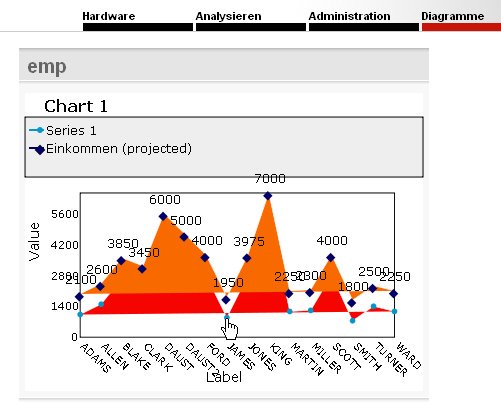
A simple chart might look like this:


When clicking on the link you would want to see a detail page in
the same browser window
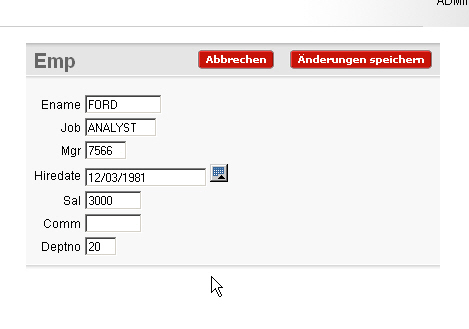
:

While this works well in Internet Explorer 6, Firefox 1.0.7 and Mozilla, what you see in Firefox 1.5 is:


This is due to a bug in Firefox 1.5 ( https://bugzilla.mozilla.org/show_bug.cgi?id=300868 )
. Unfortunately does Firefox ignore the target="_top" attribute for the xlink tag:

<a xlink:href="newdoc.html" target="_top">

The suggested workaround is :
xlink:href="javascript:window.top.location.href='newdoc.html'"

Using this fix to implement a workaround for Apex means changing a query like this:
SELECT *
FROM (SELECT 'f?p=&APP_ID.:14:' || :app_session || '::::P14_EMPNO:' || empno || ':' LINK
, ename label, sal VALUE
FROM HTMLDB_SAMPLES.EMP
WHERE sal IS NOT NULL
ORDER BY ename)

to a query like this:

SELECT *
FROM (SELECT 'javascript:window.top.location.href=''f?p=&APP_ID.:14:' || :app_session
|| '::::P14_EMPNO:' || empno || ':''' LINK
, ename label, sal VALUE
FROM HTMLDB_SAMPLES.EMP
WHERE sal IS NOT NULL
ORDER BY ename)

This works fine for all of the above mentioned browsers.

~Dietmar.